Friday, 18 November 2022

Laptop Connectivity Problems

A problem that I encounter almost daily on my 2013 MacBook Pro is a connectivity issue. Whether I'm connected wirelessly or wired via an Ethernet cable from a repeater, I lose the connection and am repeatedly prompted for the password to the WiFi network if I'm connected wirelessly. After a short while the problem goes away and all is well. The problem is annoying but doesn't seriously trouble me.

Nonetheless, I'd like to get to the bottom of it and there are plenty of requests on Internet forums from Linux Mint users for solutions to exactly this problem. The fact that it doesn't make any difference whether I'm connected via WiFi or cable rules out the WiFi hardware driver as the problem. Neither does it matter whether I'm connected to the WiFi repeater or the WiFi router.

The Internet router that I'm using is an ancient one and only operates on the 2.4 Ghz frequency with no support for 5 Ghz or any other frequencies! I don't use Bluetooth on this laptop so I've just now turned it off and I'll see if that makes any difference. It shouldn't but who knows. It's worth a try. Overall, I should be happy that things are working as well as they are given the antiquity of the technology that I'm using.

The operating system that I'm using is Linux Mint 20.3 Cinnamon with the Cinnamon version being 5.2.7. This means that the system is up-to-date. My WiFi adapter is shown in Figure 1.


Figure 1

I'd like to say that things worked flawlessly when I had Mac OS X installed on this laptop but that wasn't the case. Right from the beginning I had IP conflict alerts whenever connected to a repeater. I first encountered the issue when I stayed at a hotel in Singapore that was clearly using a repeater. In my own bedroom, where the WiFi signal was weak, I encountered the same problem when I installed a repeater. I solved the problem by connecting an Ethernet cable from the repeater to my laptop.

Thursday, 3 November 2022

Thoughts on Backing Up My Calibre Library

I thought it was time to back up my Calibre library that now is 39.8 GB in size and so I dusted off my trusty 128 GB SanDisk and thrust it into the USB 3.0 port on my old 2013 MacBook Pro. From previous experience I knew that this would be a slow process but today I got to thinking about how slow. Figure 1 shows the situation.

Figure 1

The USB 3.0 ports on the MacBook Pro can transfer data at the rate of up to 5Gbps. Now that's 5 gigabits per second. There are 8 bits in a byte and 1024 x 1024 bytes in a megabyte (MB) so that translates to a transfer speed of up to 640 MB/s.  For my file transfers I'm achieving a rate of around 4 MB/s which is 160 times slower than the maximum possible! This seems impossibly slow.

However, if we look online we find the following (see Figure 2):

Figure 2

Even SanDisk only claims a speed of up to 100 MB/s for this particular device and  presumably this is for reading of data and not writing. Furthermore, the thumb drive spends more time checking that writing and so if there are many small files (and I am transferring 34,646 of them), the transfer time will be very much longer than if I were transferring a single 39.8 MB file.

On this particular site, it's claimed that 3.0 USB has a 10~20 MB/s write speed and if that's the case then the 4 MB/s for my worst case scenario (thousands of small files) is not unreasonable. Overall it's not a problem for me because I'm in no hurry and I only carry out the backup every couple of months or so.

I'm also merging the latest library with the older one and this probably adds to the checking time as the new folder (every book has its own folder) has to be compared to the older one. It would probably be quicker just to delete the old library and simply copy the new one across.

An alternative approach would be to make a note of any new books added and then drop their folders into the library backup from time to time. On reflection this makes the most sense and the update would then be almost instantaneous given the small file sizes involved. The current library on my MacBook's SSD and the library backup on my SanDisk will be identical once the transfer is complete. This would be a good time to implement such a scheme. I'll test it out and report back.

Even if I don't make a formal note of my added books, it's easy to identify them by looking at the current library (arranged in chronological order) and noting the dates of books that are newer than the time of my last backup. This could be painful if I let too much time elapse before checking because I will have to locate each book's folder in the database and then copy and paste it across. For a few books it's no problem.

ADDENDUM: November 4th 2020

I've tested the folder copying update method out and it works fine. Quick and painless. Definitely the way to go in future. I downloaded Walter Rodney's "How Europe Underdeveloped Africa" after a recommendation by Jeremy Corbyn shown in this tweet.

The classic work of political, economic, and historical analysis, powerfully introduced by Angela DavisIn his short life, the Guyanese intellectual Walter Rodney emerged as one of the leading thinkers and activists of the anticolonial revolution, leading movements in North America, South America, the African continent, and the Caribbean. In each locale, Rodney found himself a lightning rod for working class Black Power. His deportation catalyzed 20th century Jamaica's most significant rebellion, the 1968 Rodney riots, and his scholarship trained a generation how to think politics at an international scale. In 1980, shortly after founding of the Working People's Alliance in Guyana, the 38-year-old Rodney would be assassinated. In his magnum opus, How Europe Underdeveloped Africa, Rodney incisively argues that grasping "the great divergence" between the west and the rest can only be explained as the exploitation of the latter by the former. This meticulously researched analysis of the abiding repercussions of European colonialism on the continent of Africa has not only informed decades of scholarship and activism, it remains an indispensable study for grasping global inequality today.

Sunday, 30 October 2022

Translating Figurative Language

Lately, in an effort to improve my Indonesian, I've resorted to the use of a notebook again. I decided to start with tools because I've been using them a fair bit lately. Here is what I came up with:


The more modalities that are used for vocabulary the better of course. Listening to the language using electronic devices, writing down vocabulary in a physical notebook, typing words and phrases into a computer, face-to-face interaction with a native speaker ... it all helps. The list of words above are very concrete but also very useful as most of my interactions are not of a philosophical nature!


Concrete words like "spanner" can be used figuratively in English but phrases like "throw a spanner in the works" need to be translated into Indonesian with caution. Consider the sentence: We were ready to start the project when the bank threw a spanner in the works by denying the loan. Google Translate renders this literally as: 
Kami siap untuk memulai proyek ketika bank melemparkan kunci pas dalam pekerjaan dengan menolak pinjaman

This translation really doesn't make any sense to a native speaker with little knowledge of English. A phrase in Indonesian that comes far closer is karena air setitik gula sebelanga rusak. This means literally that "a drop of water can ruin the sugar in a pan" when cooking but figuratively it means a little, seemingly inconsequential thing, can ruin a consequential undertaking. This was proposed to me by a native Indonesian speaker. It does not carry the exact same meaning as the English expression involving the spanner.


This is the problem when translating figurative language and clearly AI, as exemplified by Google Translate, struggles with it. Let's use the service to translate another phrase containing a word from the above list: thick as a brick. The translation is again literal: 
setebal batu bata whereas it really means "stupid".  An Indonesian would be baffled by such a phrase and so another fail. A similar phrase in Indonesian might be kepala udang that should translate as "a stupid person" and not "a shrimp head".

I imagine AI will rise to the challenge. It can't be too difficult to include stock phrases like "thick as a brick" in a database and to use their meanings as a first choice in preference to the meanings obtained by breaking such phrases down into individual words and then translating them. We await improvements but in the meantime it's best to avoid figurative language when trying to communicate across language barriers. 

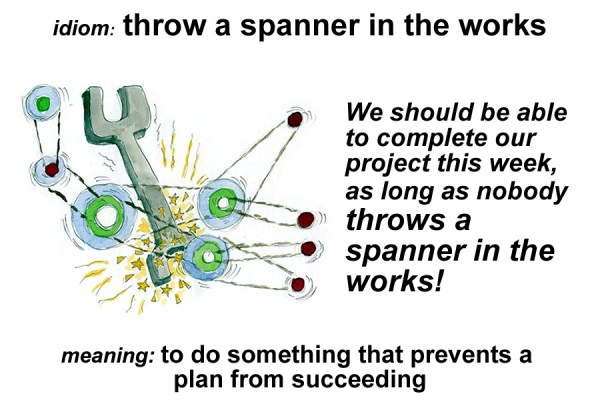
If someone is stupid then simply say so and don't say to a non-native speaker that "he's thick as a brick". If someone or something has thrown a spanner in the works then simply say so more directly as the language in the following graphic illustrates.


Thus "
he did something that prevented the plan from succeeding" could be rendered dia melakukan sesuatu yang mencegah rencananya untuk berhasil.

Thursday, 20 October 2022

Google Docs: Lesson Learned

I had a text document on Google Docs that had swelled over the years to 422 pages with numerous diagrams and my Pi 400 with its meagre 4GB of RAM would struggle to open it. Similarly my poor old 2013 MacBook Pro with 8GB of RAM would also have trouble. I finally decided that it was time to break it up into a series of smaller files. This was easier by the fact that I had already organised the content into alphabetical order. It was a simple matter of assigning the content under each letter to a new file. The original document just served as a master index to link to these new files. Figure 1 shows what it looks like now.


Figure 1: part of the opening page

Some of the files are still over 80 pages but the loading is now much faster. There seems to be a critical size for files and that, once reached, the loading time significantly increases. Figure 2 shows what the opening page of the P file looks like.


Figure 2: opening page of P document

The number of pages of the original document grew over a period of more than seven years and the lesson learned for me is that, if you're going to create something that will grow slowly but continually, make use of multiple, linked documents and don't go for the monolithic single document. It took me a good few hours to effect the changeover and the process was quite tedious and repetitive.

It's not that my Internet is too slow. Figure 3 shows the result of the speed test that I just ran.


Figure 3

I just think that there's something about Google Docs that causes it to not cope well with documents that have hundreds of pages and numerous graphics.

Wednesday, 12 October 2022

The End of Mobi

I received this interesting email from Amazon the other day after I'd sent an ebook, in mobi format, to my Kindle via email. Here was the content:

Dear Kindle Customer,

Thank you for using the Send to Kindle service to send personal documents to your Kindle library. We noticed that the following document(s), sent by you at 07:50 AM on Monday, October 10, 2022 GMT are in MOBI (.mobi, .azw) formats: froudes-history.mobi.

We wanted to let you know that starting August 2022, you’ll no longer be able to send MOBI (.mobi, .azw) files to your Kindle library. Any MOBI files already in your library will not be affected by this change. MOBI is an older file format and won’t support the newest Kindle features for documents. Any existing MOBI files you want to read with our most up-to-date features for documents will need to be re-sent in a compatible format.

Compatible formats now include EPUB (.epub), which you can send to your library using your Send to Kindle email address. We’ll also be adding EPUB support to the free Kindle app for iOS and Android devices and the Send to Kindle desktop app for PC and Mac.      

 If you have any questions, please visit our help page or contact our Customer Service team.      

 Regards,

Amazon Kindle Support


This is the 6th generation Paperwhite Kindle that I'm using

Well it's long past August 2022 but I seemed to succeed nonetheless. Mind you the mobi version I sent proved virtually unreadable with all sorts of bizarre artefacts and so I had to resend it in PDF format.  This Wikipedia article explains what's going on:

Kindle File Format is a proprietary e-book file format created by Amazon.com that can be downloaded and read on devices like smartphones, tablets, computers, or e-readers that have Amazon's Kindle app. E-book files in the Kindle File Format originally had the filename extension .azw; version 8 (KF8) introduced HTML5 & CSS3 features and have the .azw3 extension, and version 10 introduced a new typesetting and layout engine featuring hyphens, kerning, & ligatures and have the .kfx extension.

History

Kindle devices and apps are designed to use Amazon's e-book formats: AZW that is based on Mobipocket; in fourth generation and later Kindles, AZW3, also called KF8; and in seventh generation and later Kindles, KFX. Kindles now support the EPUB file format used by many other e-book readers. Similar to EPUB, Amazon's file formats are intended for reflowable, richly formatted e-book content and support DRM restrictions, but unlike EPUB, they are proprietary formats. AZW files debuted with the first Amazon Kindle in 2007.

Software such as the free and open source Calibre, Amazon's KindleGen, and the email based Send-to-Kindle service are available to convert e-books into supported Kindle file formats. Kindle devices can also display some generic document formats such as plain text (TXT) and Portable Document Format (PDF) files; however, reflowing is not supported for these file types.

In late 2011, the Kindle Fire introduced "Kindle Format 8" (KF8), also known as AZW3 file format. AZW3 supports a subset of HTML5 and CSS3 features,while acting as a container for a backwards-compatible MOBI content document.

In August 2015, all the Kindle e-readers released within the previous two years were updated with a new typesetting and layout engine that adds hyphens, kerning and ligatures to the text; e-books that support this engine require the use of the "Kindle Format 10" (KFX) file format.[8] E-books that support the enhanced typesetting format are indicated in the e-book's description on its product page.

In 2017, Amazon released Kindle Create, a tool that can convert Microsoft Word files to Kindle file format.

In 2022, while the Send-to-Kindle service only supported the original .mobi/.azw ebook formats (along with some other non-ebook file formats),[10] Amazon announced removing this support in favor of .epub which will be converted to Amazon's KF8 (.azw3) from late-2022.

In light of this news, I've just sent a epub file to my Kindle via Amazon's email service. I grabbed the book off the Internet Archive. It's titled "English Biography" by Waldo Hilary Dunn, 1882-1969, and was published in 1916. It might be interesting but the point is to check that Amazon will convert the epub format into a Kindle readable format. The result was disappointing:

Dear Kindle Customer,

The following document, sent by you at 11:56 AM on Tuesday, October 11, 2022 GMT, could not be delivered to the address you specified: englishbiography.epub

Send to Kindle supports the following document formats:

Adobe PDF (.pdf)

Microsoft Word (.doc, .docx)

Rich Text Format (.rtf)

HTML (.htm, .html)

Text (.txt) documents

Archived documents (zip , x-zip) and compressed archived documents

MOBI (.azw, .mobi) (will not support the most up-to-date Kindle features for documents)

JPEG (.jpg), GIF (.gif), Bitmap (.bmp), and PNG (.png) images .

Additionally, Send to Kindle emails now supports EPUB (.epub). Later this year, we’ll also be adding EPUB support to the free Kindle app for iOS and Android devices and the Send to Kindle desktop app for PC and Mac.

If the format of the document that failed is supported (listed above), please ensure the document is not password protected or encrypted, and try sending it again.

You can learn more about sending personal documents to your Kindle in our product info pages: https://www.amazon.com/sendtokindle

If you would like immediate assistance, please contact customer support at +1-866-321-8851 (US customers) or +1-206-266-0927 (International customers).

Yours sincerely,

Amazon Kindle Support

The letter doesn't make much sense. The mobi format is still supported whereas, in practice, the epub format is not. Hmmm. Things seem to be in a state of transition at the moment and maybe there will some sort of resolution later in the year.

Friday, 7 October 2022

Old Webcam Finds New Life

I have my  Raspberry Pi 400 connected to an old Samsung monitor but up until now I haven't had a webcam attached to it. However, I found an old Logitech webcam that I once used with my a Toshiba Satellite laptop that I bought in 2006. Amazingly this expensive and ultimately disappointing machine didn't have a webcam which is why I purchased the Logitech accessory in October of 2007. I bought the laptop in mid-2006 and had been using a UMax webcam prior to this. Here is a short YouTube video that I made at the time announcing my purchase.


After I started using Mac laptops in 2011, there was no need for the Logitech webcam and so it was left in a drawer in my study. However, today I dusted it off and plugged it into my Pi 400. After installing Cheese, I took this 640 x 480 photo:


Well, it does the job with a decidedly retro flair. Who would have thought that I'd be using this old webcam again a full 15 years later! Not that I have much use for it as I don't use Zoom or other such software but at least it's there if I need it.

Thursday, 6 October 2022

Raspberry Pi 400 (2020) versus MacBook Pro (Retina 13" late 2013)

I have two computing devices with keyboards: one is a Raspberry Pi 400 released in 2000 and which I bought in April of 2022; the other is laptop, my MacBook Pro, released in late 2013 and which I purchased in August of 2014.

The specifications are as follows:

MacBook Pro Retina 13" with 2560-by-1600 resolution at 227 pixels per inch and 2.4GHz dual-core Intel Core i5 processor (Turbo Boost up to 2.9GHz) with 3MB shared L3 cache. It has a 256GB SSD and 8GB of 1600MHz DDR3L onboard memory. The Intel Iris Graphics support dual display and video mirroring, simultaneously supports full native resolution on the built-in display and up to 2560 by 1600 pixels on up to two external displays, both at millions of colors. There is a 720p FaceTime HD camera.

The Raspberry Pi 400 contains the same general specifications as the Raspberry Pi 4 but is tweaked for this new form factor. Thanks to work on the device’s thermal performance, the processor on Pi 400 has an increased clock speed over the base Pi 4. As a result, the Pi 400 has an increased clock rate from 1.5 GHz to 1.8 GHz. Meaning you should get slightly better performance when using this device. Unlike the Pi 4, there is only one variant of the Raspberry Pi 400. You can only get 4GB of memory with this device. Another change with this device is that it only has three USB ports. One is a USB 2.0 port, and the other two are USB 3.0 ports. The rest of the specifications of the device remains the same as the Raspberry Pi 4. You have access to the same GPIO pins, gigabit ethernet, Wi-Fi, and Bluetooth as the base device.

It's probably not fair to compare the two devices but, as I use each of them daily, I will. In its day, the MacBook Pro was a premium device and it still holds it own. I've installed Linux Mint, replacing the Mac OS, and am quite satisfied with its performance. Mind you, I don't demand much of it nowadays. At most I'd have twenty tabs open in Google Chrome at any one time, sometimes watching YouTube videos or playing music in the YouTubeMusic tab. I may do some editing in Google Docs. The laptop sometimes runs hot and the fan works overtime but only when processor intensive tabs are opened like AirTable. The only hardware problem I have is the camera which ceases to function under Linux. For me this is not a problem but it might be for others who want to use programs like Zoom or the like. The battery of course after all these years is very weak and is rapidly depleted when not connected to an AC power outlet.

The Raspberry Pi 4 performs well enough given that it is a budget device. It could definitely benefit from 8GB of RAM instead of only half that. At times there is a noticeable lag in keyboard response if too many tabs are open in the Chromium browser. The Bluetooth is faulty and I've been unable to connect wireless earphones to the device. This is a problem since for some unknown reason there is no earphone jack. I've created a workaround that I've discussed in an earlier post. The keyboard is far less satisfying than the one of the laptop. The lack of a fully fledged browser like Chrome is annoying but with the Raspberry Pi OS that's what you get. I've tried booting into Linux but things didn't go and again I've described the experience in earlier posts. There's no battery for the Pi, it must be connected to an AC power supply but its form factor makes it very portable. To function, it just needs power and a monitor or TV.

The MacBook Pro model that I have is currently selling for about US$250 on Amazon while the Raspberry Pi 400 Personal Computer Kit is selling for about US$100.