Showing posts with label LaTeX. Show all posts

Friday, 2 May 2025

Mobile Font Size Problem

This problem relates to my mathematical blog where I've discovered a problem with the font size rendering of LaTeX expressions. It's noticeably smaller than the font size of the surrounding text. I asked Gemini the following question as to how to fix the problem:

In Blogger, my LaTeX mathematical expressions are noticeably smaller than surrounding normal text when viewed in mobile browsers (Chrome, Safari and Brave). However, when viewed in Chrome on my laptop, the LaTeX expressions are larger and similar in size to stringing text. I suspect that this would hold true for other browsers as well although I haven’t tested it out. How can I remedy this problem? 
Figure 1

So far it has failed to solve the problem and I'm thinking that I should try some AI alternatives as Gemini just seems to go around in circles. You'd think that, since Blogger is a Google product, that its AI should be quick to spot a solution but that's proven to be not the case. To be continued. Figure 1 shows the problem. I want the numerals in the LaTeX line: 1, 22, 55, 115, 235, 475, 3389, 13457, 35743 to be larger. It's not a huge problem but it is irritating.

Monday, 24 June 2024

Chrome Browser, Mac OS and LaTeX

Oh dear, something's awry with the interaction of LaTeX with the Chrome browser. The latter is not rendering variables in italics as it should. Figure 1 shows a screenshot of part of a post I made to my Mathematics blog. It was taken using the Safari browser and everthing looks fine.


Figure 1

Here's the same screenshot but this time taken within the Chrome browser.


Figure 2

It's not a major issue and everything else still works fine but it's a little annoying as I much prefer the italicised rendering of variables. It only has to do with Chrome on a device running the Mac operating system. The variables display properly on Chrome running on my Raspberry Pi 400 and even on Chrome running on iOS. Hopefully future updates will address this issue.

Friday, 15 April 2022

First Impressions

Copied from my blog on voodooguru.net under the same title.

I’ve only just begun to create the site on which this blog is appearing so there’s more to come as I familiarise myself with its inner workings. I made an attempt to insert some mathematical equations. using a KaTeX plugin, documentation for which can be found here. I did get single line equations working for a while but now nothing works.

I’m gradually getting my head around things. I was hoping to set up a number of blogs on this site and that is possible, although not at all straightforward. The site builder default is one blog only. For the time being I think it’s best to simply link to my Blogger blogs and continue creating blog posts on that platform. I can also link to other sites so that this site acts as a coordinating centre for my various Internet activities.

The photo shows a Raspberry Pi 400 with two monitors connected. It’s not my Pi (I only have one monitor connected) but it demonstrates the impressive capabilities of this little keyboard computer which I purchased about a week ago now.

Returning to my LaTeX problems, I’ve tried three different plugins: WP-KaTeX, KaTeX and QuickLaTeX and none of them work. It amazes me that there is such lack of support for LaTeX from the most popular blogging platform on the planet. Blogger may be out of fashion nowadays as a blogging platform but I’ve never had any problem inserting LaTeX into the posts on my mathematical blog.

Monday, 18 November 2019

Terence Tao's Software Listings

Having just now stumbled upon Terence Tao's WordPress blog, aptly named https://terrytao.wordpress.com/, I noticed that he has a panel titled software in which he lists the following:
I thought it might be a good idea to check out some of these links. I'm already familiar with the Online LaTeX Equation Editor and Sage but the latter links to William Stein's Blogger blog site. Stein is the guy who started Sage in the first place. He only made one entry in 2019, on May 1st. It's a rather long post so I'll just quote the first and last paragraphs. 
Nearly 3 years ago, I gave a talk at a Harvard mathematics conference announcing that “I am leaving academia to build a company”. What I really did is go on unpaid leave for three years from my tenured Full Professor position. No further extensions of that leave is possible, so I finally have to decide whether or not to go back to academia or resign ...
I have decided to resign. I’m worried about issues of intellectual property; it would be extremely unfair to my employees, investors and customers if I took a 50% UW position, and then later got sued by UW as a result. Having a 50% paid appointment at UW subjects one to a lot of legal jeopardy, which is precisely why I have been on 100% unpaid leave for the last three years. But more importantly, I feel very good about continuing to focus 100% on the development of CoCalc, which is going to have an incredible year going forward. I genuinely love building this (non-VC funded) company, and feel very good about it.
I'd actually read this earlier in the year and I was saddened once again to read of his struggles. Why can't philanthropists give a million dollars to a guy like this rather than to useless NGOs as they are wont to do?

I've used the Online LaTeX Equation Editor before and it does a good job for one line expressions. Figure 1 shows a screenshot. The site also generates the HTML code that can then be inserted into a web page.

Figure 1

I used Detexify the day before I wrote this after following a link I saw somewhere. It's better suited to devices that support touch input or, better still, a digital pen. It will show you the command (let's say for the integral symbol) and what package to download. An example is shown in Figure 2.

Figure 2

The LaTeX to Wordpress link leads to a blog post with a link to another post that contains a link for downloading this free software. As the author writes:
LaTeX2WP is written in Python, so you’ll need a Python interpreter. 
If you are using Linux/Unix or OS X, then you already have it. If you are running Windows, go here and get the Windows installer for 2.6.1.
Uncompress the files of the LaTeX2WP distribution in the directory in which you are going to write your posts in LaTeX. 
On OS X, double click on the file latex2wp.0.6.2.zip after saving it; on Linux unzip latex2wp.0.6.2.zip. If your Windows machine says it doesn’t know what to do with a .zip file, get 7zip. 
Write your LaTeX post, say you call it spam.tex. When you are done writing your post, type from the command line: python latex2wp.py spam.tex 
This will produce a file spam.html. Open it with a text editor, copy and paste it into the WordPress editor, and here is your post. 
This is simple enough and something that I might test out in the future. I've gotten used to using Blogger for my mathematical posts but I much prefer the look and feel of WordPress as opposed to Blogger, so I may be tempted.

GmailTeX is a Chrome Extension that enables the creation and sending of emails containing mathematical notation created using LaTeX. The creator says that "the other person does not have to have TeX for Gmail installed or to use Gmail. Math is viewable in most mail readers and browsers, including mobile ones." Figure 3 shows the result when I tried it.

Figure 3

This could be quite useful, so I'm happy to have discovered it.

The Inverse Symbolic Calculator link doesn't appear to working or is loading very slowly. It's purpose is to change a floating point decimal into a symbolic expression. The jfig link is also a dead-end. It is a java applet designed to draw xfig-like figures. The site can be found but the latest Java versions seem to present problems with its implementation. The link Subverting the system describes a collaborative software for mathematicians so it's not applicable for me in my current situation.

Overall, the GMailTex chrome extension was the main takeaway from all of this. Of course, there's lots of other interesting stuff on Terence Tao's site. For example, he writes in a post on September 4th 2019:
In the fall quarter (starting Sep 27) I will be teaching a graduate course on analytic prime number theory.  This will be similar to a graduate course I taught in 2015, and in particular will reuse several of the lecture notes from that course, though it will also incorporate some new material (and omit some material covered in the previous course, to compensate).  I anticipate covering the following topics:
  • Elementary multiplicative number theory
  • Complex-analytic multiplicative number theory
  • The entropy decrement argument
  • Bounds for exponential sums
  • Zero density theorems
  • Halasz’s theorem and the Matomaki-Radziwill theorem
  • The circle method
  • (If time permits) Chowla’s conjecture and the Erdos discrepancy problem
  • Lecture notes for topics 3, 6, and 8 will be forthcoming.
The notes he has provided so far for the course are quite comprehensive. He has links to lots of other interesting stuff so it's a good site to just poke in and see what you find.

Wednesday, 6 March 2019

CodeCogs

I noticed that Google Docs was using CodeCogs to render LaTeX into image gifs. CodeCogs at https://www.codecogs.com/latex/eqneditor.php provides an interface whereby LaTeX code can be generated quite easily together with an image of what the code would produce if rendered properly (and therefore to be used when the code can't be rendered properly). Here is the interface:

Figure 1: interface that meets the user on CodeCogs

The code can be copied into a document that interprets the LaTeX code and the result is as shown here --> \( \int_{0}^{1}x^3 dx=\bigg [\frac{x^4}{4} \bigg]_0^1\).

The image produced on the site can be simply dragged and dropped:


Alternatively, the HTML code can be inserted into the web page and the image called up from CodeCogs. The result is the same except for the pop up text box that appears when you hover over the image:


These sorts of services are useful for those who lack confidence in creating LaTeX code but there are limitations to what can be produced. There's no substitute for being able to code directly. One site that provides this facility is Overleaf, an online LaTeX editor. Projects that are created can be stored on the site and printed out if desired. The free plan only allows for solo use, no collaborators. There are paid plans that allow for collaboration and provided additional features such as synching with Dropbox and GitHub, full document history, track changes etc. Of course, if you're using a Mac like me, you can download the free program TeXShop to your computer and simply work from there, no online access required. Questions can be posed and solutions hopefully provided on StackExchange.

Thursday, 6 April 2017

Practising with g(Math)

I’ve created this page in Google Docs using g(Math). I installed the much anticipated Equatio Chrome extension but it’s a disappointment as far as I can tell. Perhaps I’m missing something. The 12 point Verdana that comprises the text of this blog was chosen in Docs because it is more compatible in size with the images generated.

The links to the images of the mathematical expressions that are created are preserved in Blogger, so that’s an alternative way of getting mathematical expressions into a blog. It seems to be quite fast compared to the alternative in which javascript on a server is accessed and used to convert LaTeX code into mathematics.

The disadvantage is that you can't amend the LaTeX code because it's not there. It was used to create the image of the mathematical expressions and then it's no longer available.

I worked out after some fiddling how to get the equal signs in equations to align. Here is the proof:


Here’s another example of alignment using a different format:


Of course, if the images appear a little large, they can be easily resized:


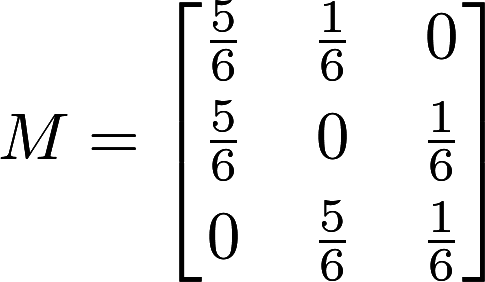
When using Google Docs, the images do take a few seconds to be created but after that they display quite promptly. Here is a matrix.


The following matrix is identical to the one above but it is being displayed with javascript that accesses the MathJax website that renders the code to display the mathematical expression: $$M = \begin{bmatrix} \frac{5}{6} & \frac{1}{6} & 0 \\[0.3em] \frac{5}{6} & 0 & \frac{1}{6} \\[0.3em] 0 & \frac{5}{6} & \frac{1}{6} \end{bmatrix}$$The difference is time between displaying the image and getting the same result by rendering the code is considerable. Google Sites of course also creates images for any LaTeX code inserted but it's far clunkier than for Google Docs (read more about this on my Google Site). With Google Docs, the g(Math) does most of the work for you. Of course, if you're viewing the previous matrix on a device running Android, then all you will see is the LaTeX notation. This is a good reason to use the graphics rather than the LaTeX code in Blogger.

So in summary:
  • Google Sites creates images of mathematical expressions from LaTeX code but it's a little clunky
  • Google Docs creates images of mathematical expressions from LaTeX code but g(Math) makes the process easier
  • Blogger will render LaTeX code if a link to MathJax is inserted into the head section of the template's HTML code OR, as I've done here, the mathematical content can be created first as images in Google Docs and then pasted into Blogger.

Friday, 31 March 2017

Google Classroom and Equatio

Google Classroom is apparently going to made available to everybody, not just teachers at registered schools. This change will roll out over the next few weeks, so I'll keep checking and hopefully have a chance to play around with it soon. Google stated:
We see value in bringing technology to people who want to learn, no matter the setting. That’s why we’re opening up Google Classroom to users without G Suite for Education accounts. Now, teachers and students in many different environments can teach or attend classes, manage assignments and instantly collaborate—all with their personal Google accounts. Starting today, these new Classroom users will be able to join existing classes and over the coming weeks, they’ll have the ability to create their own classes as well.
A change is also being made to Google Docs that it offers even better support for creating mathematical expressions. Here is what blogger Eric Curts of Control Alt Achieve had to say:
As a previous math teacher, I have a soft spot for the pains teachers and students can feel when trying to use math symbols and expressions in technology. The same thing can be said in science when typing chemical formulas. Technology seems to play best with normal letters and numbers, rather than exponents, subscripts, fractions, and such. 
Although there are many tools to help address these issues, one I have often recommended has been g(Math). This is an add-on for Google Docs, Sheets, and Forms, that provides a variety of ways to enter and insert mathematical expressions into these files. 
Recently I found out that g(Math) is getting an upgrade with a new name, new features, and new format! The new version is called Equatio and it makes it easier than ever to write with math and science symbols in Google Docs and Forms. Rather than being an add-on, this version of the tool is actually a Chrome extension, meaning eventually it will be able to work in many apps beyond just Docs and Forms. 
This new version is launching April 4, 2017, but you can see below for a sneak peek of this new tool complete with detailed directions, screenshots, and animations (click here).
So just to summarise what Equatio is all about, let's add the following excerpt from the same site that was just quoted from:
Equatio is a Chrome web extension that makes it easier to create and insert mathematical symbols and expressions, as well as scientific formulas when using Google Docs and Google Forms. Because it is a Chrome web extension, you need to be using the Chrome browser on a PC, Mac, or Chromebook to use Equatio. 
Equatio will be available for installation from the Chrome Web Store as of April 4, 2017. There will be a free version of Equatio that works in Google Docs, and a premium version that also works in Google Forms. 

I've been playing around with g(Math) and it makes adding LaTeX code easy but the resulting output is a graphic that can be resized and around which text can be wrapped. This is the same approach as adopted by Google Sites but not Blogger that makes use of Javascript to render the LaTeX characters. Equatio will operate by offering various options:
  • The Equation Editor allowing you to enter math and science content with natural language and predictions.
  • The LaTeX Editor allowing you to enter LaTeX characters
  • Handwriting Recognition
  • Speech Input
  • Symbol Galleries
All mathematical expressions and chemical formulae created using Equatio will be inserted as images that can be resized and about which text can be wrapped.

Monday, 30 January 2017

Displaying Mathematical Expressions

If looking at this post on an android device, the equations will not display properly.
\[\sum_{i=0}^n i^2 = \frac{(n^2+n)(2n+1)}{6}\]It was with some difficulty that I've finally figured out how to display mathematical expressions properly in Blogger. The approach that I've adopted is to paste the following script just above the closing head tag in the blog's template:


The MathJax javascript will then render any LaTeX mathematical expressions, such as "\sum_{i=0}^n i^2 = \frac{(n^2+n)(2n+1)}{6}" (this is the one behind the expression at the top of this post). This site explains how to use the $ sign:


The double $ signs work fine but the single $ signs, that are supposed to give the inline expression, didn't work at first with the script as above. However, after pasting a modified script (see HMTL template), all was well, with both single dollar signs  and backward slash ( ...  backward slash ) being accepted.

Back on January 27th 2016, I made a post about the ASCIIMathML and the associated javascript program ASCIIMathML.js associated with it. Here is the text of that post:
The ASCIIMathML is a markup language that claims to be close to standard mathematical notation, easy to read and easy to type. In combination with a javascript program ASCIIMathML.js it will faithfully render mathematical expressions within HTML pages. I came across it when using a new online content management service called versal. Using the mathematical gadget provided by versal, I found the markup language very easy to use and was quickly able to create relatively complex formulae. This is my public URL on versal. The free version allows for the creation of unlimited public courses whereas the PRO version (at US$50 per year) allows for the creation of private courses, the tracking of student progress and other benefits.
Apparently ASCIIMathML.js has now been incorporated into the latest version of MathJax.js and the latter is:
a cross-browser JavaScript library that displays mathematical notation in web browsers, using MathML, LaTeX and ASCIIMathML markup. MathJax is released as open-source software under the Apache License and, importantly MathJax can display mathematical notation written in LaTeX or MathML markup. Because MathJax is meant only for math display, whereas LaTeX is a document layout language, MathJax only supports the subset of LaTeX used to describe mathematical notation."   Source.
ASCIIMathML is simpler and less verbose that LaTeX but in Blogger at least, the former seems temperamental and doesn't work consistently. The following equation when entered in ASCIIMathML as "x=(-b +- sqrt(b^2 – 4ac))/(2a)" fails to display the formatted equation. However, when entered in LaTeX as "x=\frac{-b \pm \sqrt{b^2 - 4ac}}{2a}", it displays properly:
$$x=\frac{-b \pm \sqrt{b^2 - 4ac}}{2a}$$ A comprehensive list of LaTeX mathematical commands can be found here.