Showing posts with label MathJax. Show all posts

Friday, 2 May 2025

Mobile Font Size Problem

This problem relates to my mathematical blog where I've discovered a problem with the font size rendering of LaTeX expressions. It's noticeably smaller than the font size of the surrounding text. I asked Gemini the following question as to how to fix the problem:

In Blogger, my LaTeX mathematical expressions are noticeably smaller than surrounding normal text when viewed in mobile browsers (Chrome, Safari and Brave). However, when viewed in Chrome on my laptop, the LaTeX expressions are larger and similar in size to stringing text. I suspect that this would hold true for other browsers as well although I haven’t tested it out. How can I remedy this problem? 
Figure 1

So far it has failed to solve the problem and I'm thinking that I should try some AI alternatives as Gemini just seems to go around in circles. You'd think that, since Blogger is a Google product, that its AI should be quick to spot a solution but that's proven to be not the case. To be continued. Figure 1 shows the problem. I want the numerals in the LaTeX line: 1, 22, 55, 115, 235, 475, 3389, 13457, 35743 to be larger. It's not a huge problem but it is irritating.

Thursday, 6 April 2017

Practising with g(Math)

I’ve created this page in Google Docs using g(Math). I installed the much anticipated Equatio Chrome extension but it’s a disappointment as far as I can tell. Perhaps I’m missing something. The 12 point Verdana that comprises the text of this blog was chosen in Docs because it is more compatible in size with the images generated.

The links to the images of the mathematical expressions that are created are preserved in Blogger, so that’s an alternative way of getting mathematical expressions into a blog. It seems to be quite fast compared to the alternative in which javascript on a server is accessed and used to convert LaTeX code into mathematics.

The disadvantage is that you can't amend the LaTeX code because it's not there. It was used to create the image of the mathematical expressions and then it's no longer available.

I worked out after some fiddling how to get the equal signs in equations to align. Here is the proof:


Here’s another example of alignment using a different format:


Of course, if the images appear a little large, they can be easily resized:


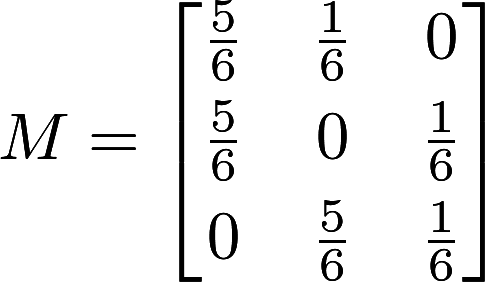
When using Google Docs, the images do take a few seconds to be created but after that they display quite promptly. Here is a matrix.


The following matrix is identical to the one above but it is being displayed with javascript that accesses the MathJax website that renders the code to display the mathematical expression: $$M = \begin{bmatrix} \frac{5}{6} & \frac{1}{6} & 0 \\[0.3em] \frac{5}{6} & 0 & \frac{1}{6} \\[0.3em] 0 & \frac{5}{6} & \frac{1}{6} \end{bmatrix}$$The difference is time between displaying the image and getting the same result by rendering the code is considerable. Google Sites of course also creates images for any LaTeX code inserted but it's far clunkier than for Google Docs (read more about this on my Google Site). With Google Docs, the g(Math) does most of the work for you. Of course, if you're viewing the previous matrix on a device running Android, then all you will see is the LaTeX notation. This is a good reason to use the graphics rather than the LaTeX code in Blogger.

So in summary:
  • Google Sites creates images of mathematical expressions from LaTeX code but it's a little clunky
  • Google Docs creates images of mathematical expressions from LaTeX code but g(Math) makes the process easier
  • Blogger will render LaTeX code if a link to MathJax is inserted into the head section of the template's HTML code OR, as I've done here, the mathematical content can be created first as images in Google Docs and then pasted into Blogger.

Monday, 30 January 2017

Displaying Mathematical Expressions

If looking at this post on an android device, the equations will not display properly.
\[\sum_{i=0}^n i^2 = \frac{(n^2+n)(2n+1)}{6}\]It was with some difficulty that I've finally figured out how to display mathematical expressions properly in Blogger. The approach that I've adopted is to paste the following script just above the closing head tag in the blog's template:


The MathJax javascript will then render any LaTeX mathematical expressions, such as "\sum_{i=0}^n i^2 = \frac{(n^2+n)(2n+1)}{6}" (this is the one behind the expression at the top of this post). This site explains how to use the $ sign:


The double $ signs work fine but the single $ signs, that are supposed to give the inline expression, didn't work at first with the script as above. However, after pasting a modified script (see HMTL template), all was well, with both single dollar signs  and backward slash ( ...  backward slash ) being accepted.

Back on January 27th 2016, I made a post about the ASCIIMathML and the associated javascript program ASCIIMathML.js associated with it. Here is the text of that post:
The ASCIIMathML is a markup language that claims to be close to standard mathematical notation, easy to read and easy to type. In combination with a javascript program ASCIIMathML.js it will faithfully render mathematical expressions within HTML pages. I came across it when using a new online content management service called versal. Using the mathematical gadget provided by versal, I found the markup language very easy to use and was quickly able to create relatively complex formulae. This is my public URL on versal. The free version allows for the creation of unlimited public courses whereas the PRO version (at US$50 per year) allows for the creation of private courses, the tracking of student progress and other benefits.
Apparently ASCIIMathML.js has now been incorporated into the latest version of MathJax.js and the latter is:
a cross-browser JavaScript library that displays mathematical notation in web browsers, using MathML, LaTeX and ASCIIMathML markup. MathJax is released as open-source software under the Apache License and, importantly MathJax can display mathematical notation written in LaTeX or MathML markup. Because MathJax is meant only for math display, whereas LaTeX is a document layout language, MathJax only supports the subset of LaTeX used to describe mathematical notation."   Source.
ASCIIMathML is simpler and less verbose that LaTeX but in Blogger at least, the former seems temperamental and doesn't work consistently. The following equation when entered in ASCIIMathML as "x=(-b +- sqrt(b^2 – 4ac))/(2a)" fails to display the formatted equation. However, when entered in LaTeX as "x=\frac{-b \pm \sqrt{b^2 - 4ac}}{2a}", it displays properly:
$$x=\frac{-b \pm \sqrt{b^2 - 4ac}}{2a}$$ A comprehensive list of LaTeX mathematical commands can be found here.